Stop Using Headless Users for ArcGIS Enterprise Automation

Increasingly I am working with organizations wanting to disable all built-in user accounts in ArcGIS Enterprise so everybody has to use their identity provider login through SAML or OpenID integration.
This makes sense. If an organization is using an enterprise identity provider, there is a good argument for getting rid of locally managed username and password accounts wherever possible.
Then, we get to the Python scripts. Frequently there are automated processes, sometimes quite a few of them, running unattended using a dedicated built-in ArcGIS Enterprise account. You know the account I am talking about...gis_automation, svc_arcgis, python_user, or whatever variation happens to exist in the organization.
The account gets created, assigned a password, and given whatever privileges the scripts need. The credentials get tucked away somewhere so a scheduled process can log into ArcGIS Enterprise.
Now security mandates disabling built-in accounts, but they cannot disable this one. Production automation depends on it.
It works.
I have done it.
There is a better way.

Users Are for People
This sounds ridiculously obvious, but a user account represents a user.
When somebody signs into ArcGIS Enterprise, this makes perfect sense. The living and breathing human being authenticates with the identity provider using multi-factor authentication, ArcGIS determines what they are authorized to do, and they work with whatever content and capabilities their account permits.
An automated process is different.
There is nobody sitting there at 2:00 AM typing a password. The script is the thing attempting to authenticate.
Historically, the simple solution has frequently been to make the script pretend to be somebody.
from arcgis.gis import GIS

gis = GIS(
    "https://portal.example.com/portal",
    "svc_automation",
    password
)
The ArcGIS API for Python authentication documentation shows this username and password pattern along with a number of other supported authentication schemes. Working with different authentication schemes [developers...arcgis.com]
Aside from securely storing the password, using a user identity creates an interesting architectural problem. The automation is authenticating as an identity designed to represent a person. Also, when multi-factor authentication is a requirement, a script cannot pick up a phone and provide the input in an authentication application.
Starting with ArcGIS Enterprise 11.4, there is another option specifically intended for this job.
Give the Application an Identity
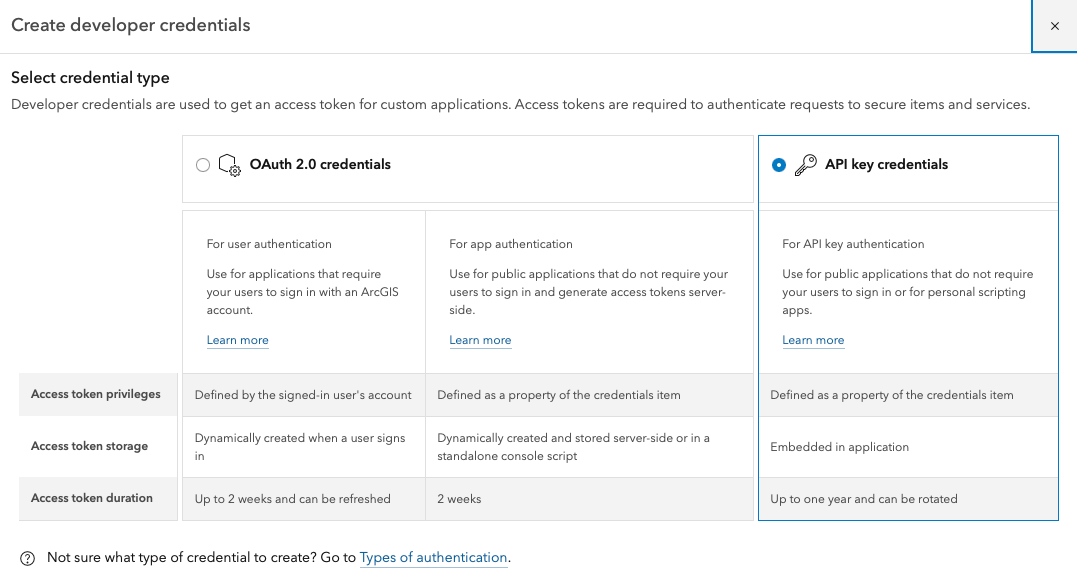
Beginning with ArcGIS Enterprise 11.4, ArcGIS Enterprise supports OAuth 2.0 credentials for application authentication. Esri describes app authentication as using an OAuth 2.0 client ID and client secret to obtain a short-lived access token authorizing the application to access ArcGIS services and items. OAuth credentials for app authentication in ArcGIS Enterprise [developers...arcgis.com]
Instead of this:
script
  |
  +-- username
  +-- password
  |
  v
ArcGIS Enterprise user
we can use:
script
  |
  +-- client ID
  +-- client secret
  |
  v
OAuth 2.0
  |
  +-- short-lived access token
  |
  v
ArcGIS Enterprise
There is a subtle but important distinction here.
The identity authenticating to ArcGIS Enterprise now represents the application, not a fictitious human running the application.
That is a much better model for unattended automation.
The Application Is an Item
The OAuth credentials themselves are represented by an item in the Web GIS containing the parameters required to implement user or app authentication. [developers...arcgis.com]
This becomes especially useful when thinking about the lifecycle of automation.
Imagine I write a Python script automating some business process. I create the application item and configure the privileges it requires. Initially, I own that item because I built the automation.
Conceptually, we now have something like this:
Joel
 |
 +-- owns --> Application Item
                 |
                 +-- OAuth credentials
                 +-- privileges
                 +-- item access
                 |
                 v
             Python Script
The important part is:
I own the application, but I am not the application.
Eventually, I may change roles, leave the organization, or my named user may be disabled. The application's identity is distinct from my identity.
That creates a considerably cleaner operational model. Responsibility for the application item can follow responsibility for the automation itself rather than requiring the script to continue authenticating as the person who originally wrote it.
Really, this means the application item needs to be considered part of the automation:
Source Code
    +
Application Item
    +
OAuth Configuration
    +
Secret
    +
Execution Environment
    =
Automation
The question stops being:
"Who owns the service account?"
and becomes:
"Who owns this application?"
That may sound like semantics, but operationally it is an important distinction.
It Also Gives Us Least Privilege
This is probably the part I like the most, what most of my clients are concerned about.
OAuth credentials in ArcGIS Enterprise can be configured with privileges determining what the resulting access token is allowed to do. Esri identifies available privileges including general portal operations, administrative portal operations, and spatial analysis services. The exact privileges available depend on the user type and role of the ArcGIS Enterprise account creating the credentials. See OAuth credential privileges [developers...arcgis.com]
Access can also be granted to specific Portal items rather than simply giving the application broad access. According to the documentation, OAuth credentials can currently be configured with access to a maximum of 100 specified items. [developers...arcgis.com]
This means we can start thinking about automation like this:
What is the minimum this application actually needs to do?
That is considerably better than:
Which user role can I give svc_python so this finally starts working?A Client Secret Is Still a Secret
Obviously, replacing a password with a client secret does not mean we can paste the client secret into automation.py and call the problem solved.
It is still a credential.
For app authentication, ArcGIS Enterprise OAuth credentials provide the client ID and client secret used to obtain the access token. [developers...arcgis.com]
Consequently, I want the secret completely outside the source code.
Conceptually:
Scheduled Process
       |
       v
Python Script
       |
       +---- Secret Store
       |        |
       |        +-- client secret
       |
       v
OAuth Token Request
       |
       v
short-lived access token
       |
       v
ArcGIS Enterprise
Obviously, replacing a password with a client secret does not mean I should paste the client secret into automation.py and call the problem solved. The secret still needs to live someplace appropriate.
Fortunately, if using the ArcGIS API for Python, the GISobject already has a useful mechanism for separating stored authentication information from my script: persistent profiles. As detailed under Storing your credentials locally, a profile stores connection information locally while passwords are handled through Python's keyring module and the operating system's credential store.
Once the profile exists, subsequent scripts can create the connection simply by referencing its name. Logging into ArcGIS Enterprise in the script becomes little more than referencing the named profile. Nothing sensitive is in the Python source code.
from arcgis.gis import GIS

gis = GIS(profile="my_automation")
A GIS profile certainly is not the only way to solve this. An organization may already have an enterprise secrets-management platform it prefers to use.
The important part of the pattern is not the particular key store. It is separating the application secret from the source code and retrieving it securely at runtime.
There Is One Big Catch
Application authentication in ArcGIS Enterprise requires ArcGIS Enterprise 11.4 or later.
Creating OAuth credentials requires an ArcGIS Enterprise account with a Creator user type or higher. For app authentication, the account also needs the custom-role privilege General privileges > Content > Assign privileges to OAuth 2.0 applications. See the ArcGIS Enterprise prerequisites.
The available privileges depend on the account used to create the OAuth credentials, and the credential must actually be authorized for the operations the automation is trying to perform. [developers...arcgis.com]
Consequently, approach migrating an existing automation by first figuring out exactly what the script does in ArcGIS. Following the principle of least permissions, give this application identity everything this process needs, and nothing it does not, but if something is missing, start looking at the permissions of your logged in user. Maybe they do not have the permissions, and consequently, cannot grant permissions to the application item.
My New Default
For new unattended automation against ArcGIS Enterprise 11.4 or later, my starting architecture is now:
Managed OS Execution Identity
           |
           v
    Python Automation
           |
           +---- securely stored client secret
           |
           v
 Application Item in Web GIS
           |
           +---- OAuth credentials
           +---- defined privileges
           +---- defined item access
           |
           v
   Short-Lived Access Token
           |
           v
     ArcGIS Enterprise
The important part to me is that the application now has an identity and lifecycle of its own.
Someone owns the source code.
Someone owns the application item.
Someone is responsible for the secret.
Someone is responsible for the execution environment.
These responsibilities can change hands without requiring the application itself to masquerade as whoever originally wrote the Python script.
The principles behind it are pretty simple:
- People get user identities.
- Applications get application identities.
- Give the application only the privileges it actually needs.
- Keep secrets out of source code.
- Use short-lived access tokens rather than carrying user credentials around.
- Use a dedicated automation user only when the required ArcGIS operation cannot be accomplished using application authentication.
- Treat the application item as part of the automation. It has an owner, configuration, privileges, and a lifecycle. The person responsible for it may change. The application does not have to.
None of this makes the Python doing the actual GIS work particularly different.
It just means the script no longer has to pretend to be a person.
And really, that makes a lot more sense.